

You are using an out of date browser. It may not display this or other websites correctly.
You should upgrade or use an alternative browser.
You should upgrade or use an alternative browser.

Advanced Scene Switcher 1.35.0
- Author Warmuptill
- Creation date
- Featured
Important notes:
- The minimum supported OBS version is OBS 31.1.1.
- Please make sure to back up your settings!
- If you run into any issues, please either post in the OBS forums or create an issue on GitHub!
Additions:
- Added an option wait for a scene item transition to the "Scene item visibility" action.

- Added an option to wait for a variable to change in the "Wait" action type.

- Added an option to get Twitch ad info in the Twitch action.

- Added an option to start and stop Twitch polls in the Twitch action.

Unfortunately, this feature is untested. So, if you run into any issues, please do let me know!- Added variable support for color selections in the "Video" condition.

- Added an option to automatically extract a value from a JSON query result in the Variable action.

Changes:
- The Twitch chat and event subscriptions connections are now closed when the plugin is stopped.
- The macro export dialog now sorts resources alphabetically and adds scrollbars for easier navigation.
- The condition / action type selection is now focused automatically when a new condition or action is added.
- Added variable setter / getter support to inline script generated code, making it easier to read and write variables directly from inline scripts via
advss_get_variable_valueandadvss_set_variable_valuerespectively.- Improved native Wayland window tracking on Linux when using KWin. Window conditions now correctly trigger for native Wayland windows alongside XWayland windows.
- The Windows portable zip artifact has been renamed from legacy to portable for consistency with other plugin naming conventions.
- Minor UI spacing / layout changes.
Fixes:
- Fixed a freeze when stopping a waiting macro via the "Run macro" button.
- Fixed variables of nested macros' actions not being resolved correctly.
- Fixed nested macro actions being executed twice when added to a queue.
- Fixed window conditions not triggering for native Wayland windows on Linux.
- Fixed a crash on transition start in Studio Mode.
Important notes:
- The minimum supported OBS version is OBS 31.1.1.
- Please make sure to back up your settings!
- If you run into any issues, please either post in the OBS forums or create an issue on GitHub!
1.34.2 Hotfix Changes:
- The Windows installer will now support both, installations directly in the OBS installation directory, and the ProgramData directory.
- Improved Twitch event subscription reconnection handling.
- Fixed a freeze when choosing invalid OCR model in the "Video" condition.
- Fixed a crash when importing macros is exceptionally slow.
- Fixed a crash on shutdown.
1.34.1 Hotfix Changes:
- Fixed a crash on startup when using conditions or actions referencing multiple other macros.
Additions:
- Added an option to check the file path of a running process in process-related conditions.
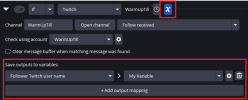
- Added the ability to map macro property values directly to variables, removing the need for a separate "Variable" action.
- Added a "Keep source active" option to the "Game Capture" and "Video" condition types, allowing video sources to remain active even if they are not visible.
- Added a new "Macro Schedule" tab.
It is intended to ease scheduling the execution of macro actions at a given date / time.- Added a "Run macro" option to the "Macro" action type. When triggered, it evaluates the selected macro's conditions and runs either its actions or else-actions based on the result.
Changes:
- Added a "Get current values" button to the "Streaming" action, making it easier to populate settings from the active stream configuration.
- Reworked shutdown handling for greater stability.
If you experience any issues when closing OBS and suspect this plugin may be involved, please report them.- All tabs are now visible by default when the setup wizard is skipped.
- Updated the Windows installation path for plugin files.
The zip archive contains the backward-compatible old directory structure alongside the new one.- The "Ignore entry" logic selector in conditions now uses a toggle button, consistent with how it is handled for actions.
- Fixed minor logging and UI highlighting issues affecting paused macros.
- Renamed the "Reevaluate the condition state before executing this action" setting found in the "Run macro actions" option of the "Macro" action to "Check conditions now, even if macro is paused" for clarity.
- You can now explicitly choose which variables, action queues, and other resources to export alongside a selected macros.
Previously, exporting a macro would automatically include all associated variables and action queues, while silently skipping items with potential privacy implications (e.g. Twitch connections).- Added macro properties to the "Window" condition for the window position and size.
- Added position and size macro properties to the "Video" condition's option to detect patterns.
Fixes:
- Fixed a potential freeze when closing OBS.
- Fixed an issue where the Twitch condition could stop receiving new events under certain circumstances.
- Fixed transition signals not being connected when changing the "Scene" selection of the "Transition" condition.
- Fixed the "Transitioning from" check of the "Transition" condition not working correctly in Studio Mode.
- Fixed a crash when using OCR mode of the "Video" condition with custom training data.
- Fixed a crash when using the "Streaming" action or condition to access stream settings.
- Fixed macOS "fullscreen" detection of the "Window" condition not working.
- Improved reliability of the macOS "maximized" detection of the "Window" condition.

Important notes:
- The minimum supported OBS version is OBS 31.1.1.
- Please make sure to back up your settings!
- If you run into any issues, please either post in the OBS forums or create an issue on GitHub!
1.34.1 Hotfix Changes
- Fixed a crash on startup when using conditions or actions referencing multiple other macros.
Additions:
- Added an option to check the file path of a running process in process-related conditions.

- Added the ability to map macro property values directly to variables, removing the need for a separate "Variable" action.

- Added a "Keep source active" option to the "Game Capture" and "Video" condition types, allowing video sources to remain active even if they are not visible.

- Added a new "Macro Schedule" tab.

It is intended to ease scheduling the execution of macro actions at a given date / time.- Added a "Run macro" option to the "Macro" action type. When triggered, it evaluates the selected macro's conditions and runs either its actions or else-actions based on the result.

Changes:
- Added a "Get current values" button to the "Streaming" action, making it easier to populate settings from the active stream configuration.
- Reworked shutdown handling for greater stability.
If you experience any issues when closing OBS and suspect this plugin may be involved, please report them.- All tabs are now visible by default when the setup wizard is skipped.
- Updated the Windows installation path for plugin files.
The zip archive contains the backward-compatible old directory structure alongside the new one.- The "Ignore entry" logic selector in conditions now uses a toggle button, consistent with how it is handled for actions.

- Fixed minor logging and UI highlighting issues affecting paused macros.
- Renamed the "Reevaluate the condition state before executing this action" setting found in the "Run macro actions" option of the "Macro" action to "Check conditions now, even if macro is paused" for clarity.
- You can now explicitly choose which variables, action queues, and other resources to export alongside a selected macros.

Previously, exporting a macro would automatically include all associated variables and action queues, while silently skipping items with potential privacy implications (e.g. Twitch connections).- Added macro properties to the "Window" condition for the window position and size.
- Added position and size macro properties to the "Video" condition's option to detect patterns.
Fixes:
- Fixed a potential freeze when closing OBS.
- Fixed an issue where the Twitch condition could stop receiving new events under certain circumstances.
- Fixed transition signals not being connected when changing the "Scene" selection of the "Transition" condition.
- Fixed the "Transitioning from" check of the "Transition" condition not working correctly in Studio Mode.
- Fixed a crash when using OCR mode of the "Video" condition with custom training data.
- Fixed a crash when using the "Streaming" action or condition to access stream settings.
- Fixed macOS "fullscreen" detection of the "Window" condition not working.
- Improved reliability of the macOS "maximized" detection of the "Window" condition.
Attachments
Important notes:
- The minimum supported OBS version is OBS 31.1.1.
- Please make sure to back up your settings!
- If you run into any issues, please either post in the OBS forums or create an issue on GitHub!
Additions:
- Added an option to check the file path of a running process in process-related conditions.

- Added the ability to map macro property values directly to variables, removing the need for a separate "Variable" action.

- Added a "Keep source active" option to the "Game Capture" and "Video" condition types, allowing video sources to remain active even if they are not visible.

- Added a new "Macro Schedule" tab.

It is intended to ease scheduling the execution of macro actions at a given date / time.- Added a "Run macro" option to the "Macro" action type. When triggered, it evaluates the selected macro's conditions and runs either its actions or else-actions based on the result.

Changes:
- Added a "Get current values" button to the "Streaming" action, making it easier to populate settings from the active stream configuration.
- Reworked shutdown handling for greater stability.
If you experience any issues when closing OBS and suspect this plugin may be involved, please report them.- All tabs are now visible by default when the setup wizard is skipped.
- Updated the Windows installation path for plugin files.
The zip archive contains the backward-compatible old directory structure alongside the new one.- The "Ignore entry" logic selector in conditions now uses a toggle button, consistent with how it is handled for actions.

- Fixed minor logging and UI highlighting issues affecting paused macros.
- Renamed the "Reevaluate the condition state before executing this action" setting found in the "Run macro actions" option of the "Macro" action to "Check conditions now, even if macro is paused" for clarity.
- You can now explicitly choose which variables, action queues, and other resources to export alongside a selected macros.

Previously, exporting a macro would automatically include all associated variables and action queues, while silently skipping items with potential privacy implications (e.g. Twitch connections).- Added macro properties to the "Window" condition for the window position and size.
- Added position and size macro properties to the "Video" condition's option to detect patterns.
Fixes:
- Fixed a potential freeze when closing OBS.
- Fixed an issue where the Twitch condition could stop receiving new events under certain circumstances.
- Fixed transition signals not being connected when changing the "Scene" selection of the "Transition" condition.
- Fixed the "Transitioning from" check of the "Transition" condition not working correctly in Studio Mode.
- Fixed a crash when using OCR mode of the "Video" condition with custom training data.
- Fixed a crash when using the "Streaming" action or condition to access stream settings.
- Fixed macOS "fullscreen" detection of the "Window" condition not working.
- Improved reliability of the macOS "maximized" detection of the "Window" condition.
Important notes:
- The minimum supported OBS version is OBS 31.1.1.
- Please make sure to back up your settings!
- If you run into any issues, please either post in the OBS forums or create an issue on GitHub!
1.33.1 Hotfix Changes
- Fixed some actions and conditions not persisting their internal state properly.
- The new "Source interaction" action will now refresh its sources list when closing and opening the macro again.
Additions:
- Added the "Source Interaction" action.

It will enable you to record interactions with e.g. Browser sources and replay them at.- Added the action type "Play audio file".

- Added the option to add a new recording chapter.

- Added support for controlling the "T-Bar" in Studio Mode to the "Transition" action.

- Added additional Twitch actions:
- Send shoutout
- Cancel raid
- Enable/disable shield mode
- Enable/disable branded content
- Various user moderation actions (ban, block, VIP, moderator, ...)
- Chat settings toggles (emote-, follower-, subscriber-only, slow-mode, ...)
I wasn't able to test them all.So, if you run into any issues please do let me know!- Added the "HTTP" condition type.

It will enable you to send http requests to the advanced scene switcher to trigger macros.- Added a "Get macro info" action.

- Added macro properties to the "Sequence" and "Random" actions to expose the macro that was executed.
- Added a "Next Macro" macro property to "Sequence" actions.
- Added the option to expose the current settings of a source as a macro property.
- Added the option to suppress the crash dialog shown when an unclean shutdown is detected.
Changes:
- Removed deprecated functionality from the "File" condition.
These options were hidden when not used for a few years now.
So, I hope I didn't break anyone's setup with this change.- Validated that the user ID matches the token in the Twitch integration.
- The macro list now scrolls to newly added macro segments.
Fixes:
- Fixed the "File" condition's "content changed" and "date changed" checks incorrectly triggering on plugin startup.
- Fixed a crash when the "Mathematical expression" of the "Variable" action type was used concurrently.
- Fixed a few race conditions when accessing variables.
- Fixed the title of the "Open" dialog of the "Script" action and condition.
- Fixed macro list / macro edit area splitter resizing when horizontally large widgets (e.g. the Window condition) were part of the selected macro.
- Fixed Twitch event subscription handling:
- Revocations were sometimes not handled properly.
- Active subscriptions were not cleared on reconnect
- A server migration could cause a crash in rare circumstances.
- Improved error logging.
Important notes:
- The minimum supported OBS version is OBS 31.1.1 for Windows and macOS.
The .deb package is built for OBS 32.1.0 on Ubuntu 24.- Please make sure to back up your settings!
- If you run into any issues, please either post in the OBS forums or create an issue on GitHub!
Additions:
- Added additional modes to control how the actions of a macro are executed in case the conditions are met:

This replaces the old "Perform actions only on condition change" setting.This is now represented as "Perform actions -> only when result changes".- Added a minimal setup wizard to help with the initial configuration and explain how the plugin works.
- The "Similarity Rating" from pattern matching is now exposed as a macro property.
Fixes:
- Fixed an issue where file selection fields displayed resolved variable values instead of the variable itself.
- Fixed an issue where the first action of paused macros could still execute in certain scenarios.
- Delayed dialog popups during startup to prevent OBS from freezing on some systems.
Important notes:
- The minimum supported OBS version is OBS 31.1.1.
- Please make sure to back up your settings!
- If you run into any issues, please either post in the OBS forums or create an issue on GitHub!
Additions:
- You can now select multiple week days in the simple view of the date condition.

- Added support for OBS websocket "vendor requests" that allow you to run macros and set variables remotely.
Example messages are available here:
https://github.com/WarmUpTill/Scene...os-and-setting-variables-using-vendorrequestsFixes:
- Fixed an issue where the Stream Deck condition did not correctly detect the "key down" state.
- Fixed a crash introduced in 1.32.7 that could occur when adjusting multiple scene item transitions in parallel.
Important notes:
- The minimum supported OBS version is OBS 31.1.1.
- Please make sure to back up your settings!
- If you run into any issues, please either post in the OBS forums or create an issue on GitHub!
Additions:
- Transitions can now be configured when showing or hiding sources using the Scene item visibility action.

- Added the option to pick a random value for a variable from a predefined list.

Other changes:
- The HTTP action now supports supplying parameters directly in the URL when the parameter settings are not used.
- Minor UI highlighting and tooltip updates.
Fixes:
- Fixed an issue where Twitch connections could not be reestablished after the local machine closed the connection.
- The plugin will now refuse to change a source setting to an invalid JSON object, as this could cause crashes.
- Fixed a crash when using the Game capture condition when capturing a game without a window title.
Important notes:
- The minimum supported OBS version is OBS 31.1.1.
- Please make sure to back up your settings!
- If you run into any issues, please either post in the OBS forums or create an issue on GitHub!
Fixes:
- Fixed scene selections not being saved properly when scenes of a secondary canvas (e.g. vertical canvas) were selected.
- Fixed variable tab dock hotkeys conflicting with other OBS hotkeys.
Important notes:
- The minimum supported OBS version is OBS 31.1.1.
- Please make sure to back up your settings!
- If you run into any issues, please either post in the OBS forums or create an issue on GitHub!
Additions:
- Added an option in the "General" tab to always show feature tabs (e.g., Variables, Twitch) instead of only on first use.

- Added an option to the Twitch action to query channel information.

Other changes:
- Added a macro property to the "Recording" condition to expose the last saved recording path.
- Enabled selection of macro groups for certain options in the "Macro" and "Timer" actions.
Fixes:
- Fixed a potential freeze during shutdown of OBS or when changing scene collections.
- Fixed a minor memory leak in the Source condition when checking list-based settings.